


 Close Menu
 World
 Biography
 Health
 Education
 Business
 Lifestyle
 Sports
 Technology
 Animals
 History
 Food
 Religious
 Startups
 Movies
 Politics
 Fashion
 Covid
 Diet
 Fitness
 Marketing
 Travel
 Science
 Reviews
 Social media
 Stories
 Facts
 Art
 Entertainment
Ticketor

Movies
How Theater Ticketing Systems Help Movie Theaters Streamline Daily Operations
 Ticketor
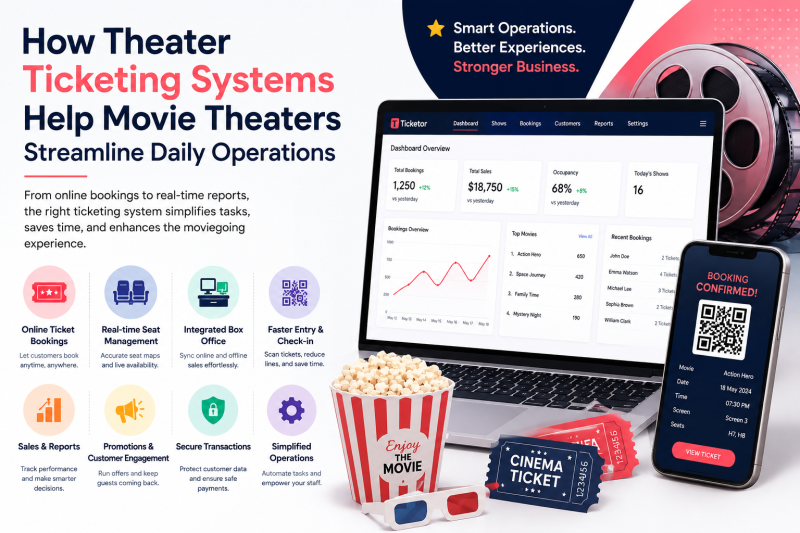
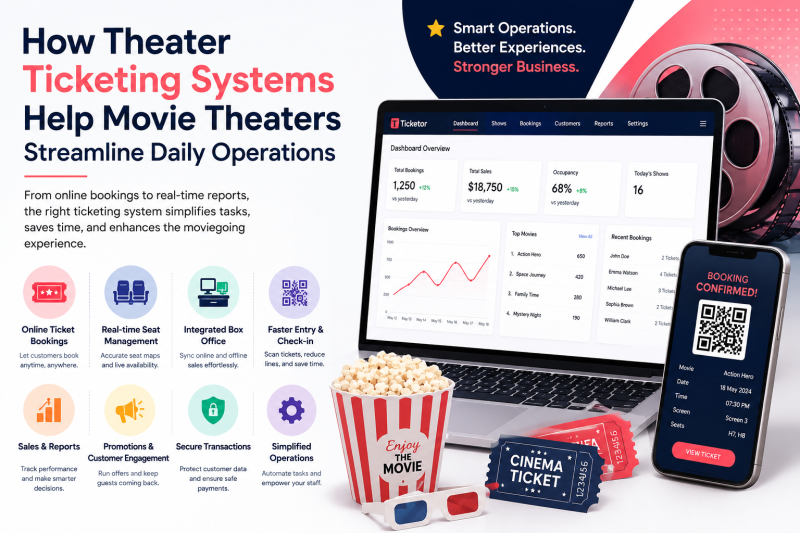
Managing a movie theater means coordinating many tasks at once. Staff must publish showtimes, sell tickets, manage seats, process payments, welcome guests, and review performance. Theater ticketing systems bring these activities into a connected workflow, helping cinema teams reduce manual work and keep each screening organized.
1. Simplifying Online Ticket Sales
Customers expect to browse films and book seats whenever it suits them. An online booking page lets visitors check dates, compare showtimes, view prices, and complete purchases without waiting at the box office.
A clear checkout should display the selected screening, seat details, fees, and payment status before an order is confirmed. Automatic confirmation emails or digital tickets give customers a convenient record and reduce routine questions for employees.
2. Keeping Seat Availability Accurate
Seat management becomes complicated when online purchases and counter sales happen simultaneously. A shared seating chart gives customers a view of available places and helps staff understand which seats have been reserved. Updating inventory as orders are completed can reduce the risk of duplicate bookings.
A flexible system allows managers to configure different room layouts, capacities, accessible seating areas, and premium sections for each room and screening.
3. Connecting Box Office and Online Workflows
The physical box office remains important, even when many guests book online. Employees need to sell walk-in tickets, answer questions, process eligible refunds, and locate orders quickly. Theater ticketing software can connect these activities with online inventory so staff are not maintaining separate records.
A connected point-of-sale process can make it easier to handle different payment methods and ticket categories. For busy evening sessions, fewer manual steps can make a meaningful difference to service speed and accuracy. For example, theater ticketing software should make common actions easy to find, whether an employee is checking an order or issuing a ticket. Consistent screens across devices can also reduce the time needed to switch between tasks during a crowded shift.
4. Speeding Up Guest Admission
The customer experience continues after a ticket has been purchased. During popular releases, queues at the entrance can build quickly if every booking must be checked manually. Digital tickets with barcodes or QR codes allow staff to scan admission and verify a ticket efficiently.
A clear scanning process helps employees identify valid tickets and spot repeated scans. Attendance information can also help supervisors understand how many guests have arrived and whether additional staff are needed.
5. Making Daily Scheduling Easier
Showtime planning involves balancing audience demand, screen availability, film schedules, and staffing. When managers can review bookings and attendance patterns, they have better information for deciding whether a screening needs a larger auditorium or whether another session may be worthwhile.
Centralized screening details also reduce the need to update multiple places separately. Staff can check current information when answering questions, while managers can make schedule changes with a clearer view of the operational impact.
6. Improving Sales Reporting
Managers need more than a total at the end of the day. Useful reports can organize transactions by film, date, showtime, ticket type, or sales channel. These views help identify busy periods, popular titles, and screenings that may need a different approach.
Reliable records can support cash reconciliation, revenue reviews, and decisions about promotions. Comparing results over time may reveal patterns that are not obvious during a busy shift.
7. Supporting Promotions and Customer Communication
Special offers can encourage attendance during quieter periods or introduce audiences to different kinds of films. Discount codes, membership options, and ticket packages can give cinemas practical ways to shape promotions.
Customer communication can also be more organized when booking details and mailing tools work together. With appropriate permission, theaters can share upcoming releases, special screenings, and schedule updates.
8. Reducing Staff Workload
A well-organized platform can reduce repetitive tasks such as checking seat availability, searching for order details, or compiling basic sales figures. Instead, it gives employees more time to assist guests, maintain the lobby, and respond to unexpected situations.
Managers should choose tools that staff can learn without a long or confusing process.
9. Choosing Tools That Fit the Venue
Not every cinema has the same operating model. A single-screen independent theater may prioritize simple online sales and reporting, while a multiplex may need multiple auditorium layouts, user roles, and high-volume scanning. Theater ticketing software should match the venue's actual workflow rather than overwhelm teams with features they rarely use.
Before selecting a provider, managers can map their booking, payment, refund, admission, and reporting needs.
Platforms such as Ticketor illustrate how ticket sales, seating, box office activity, and admission tools can be brought together. Ticketor offers another example for comparison for cinemas. Ticketor is one option; the best choice is the one that supports reliable service and sustainable operations.
Conclusion
Daily cinema management depends on coordination. When booking, seat inventory, counter sales, entry, and reporting share accurate information, teams can spend less time correcting records and more time serving audiences. Theater ticketing systems are most effective when they simplify real tasks, remain easy for employees to use, and give customers a straightforward way to plan a visit. Thoughtful selection and staff training help turn technology into a dependable part of cinema operations.
FAQ
How do ticketing tools help movie theaters manage daily operations?
They can connect online bookings, seat availability, box office sales, admission scanning, and reports in one workflow, reducing repetitive administration.
Can customers select their seats before arriving?
Yes. A platform with interactive seating charts can show available seats and let customers choose during online checkout.
Do online bookings replace box office sales?
No. Many theaters need both channels. A connected system can help keep online and in-person sales synchronized.
What should managers compare before choosing a platform?
They should assess ease of use, seating options, payment methods, scanning, reporting, integrations, support, data protection, and total cost.
Source:
Click for the: Full Story
You might like









You Might Like this