


 Close Menu
 World
 Biography
 Health
 Education
 Business
 Lifestyle
 Sports
 Technology
 Animals
 History
 Food
 Religious
 Startups
 Movies
 Politics
 Fashion
 Covid
 Diet
 Fitness
 Marketing
 Travel
 Science
 Reviews
 Social media
 Stories
 Facts
 Art
 Entertainment
remo hoson

Business
Charles Schwab Login: Schwab.com, 401(k), Workplace and Account Sign-In Guide
 remo hoson
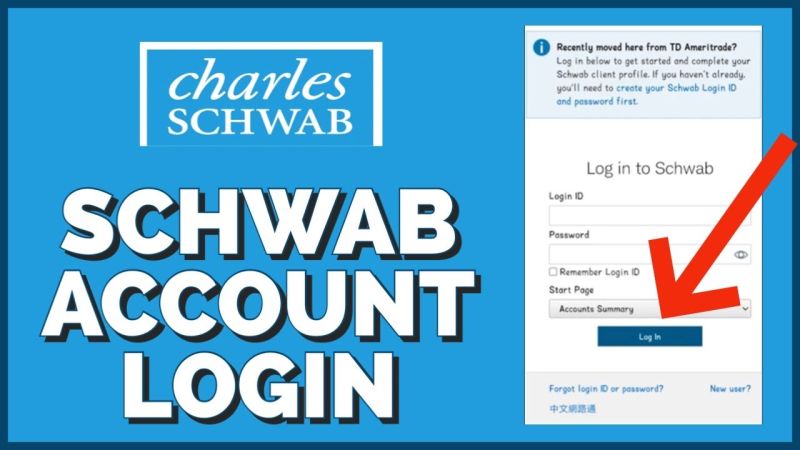
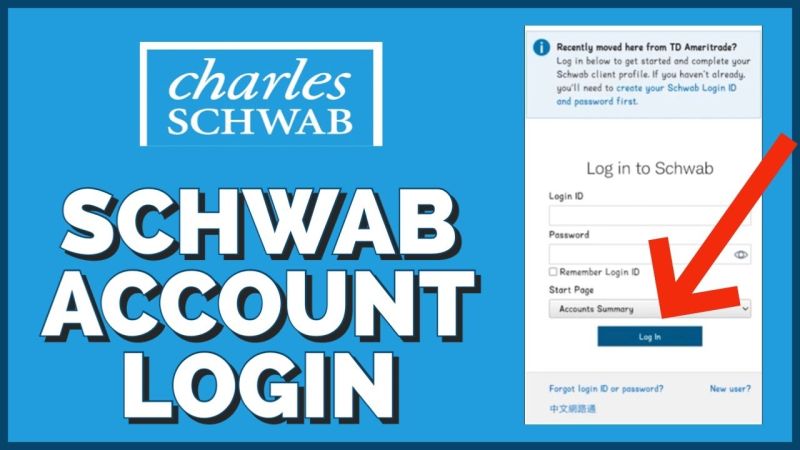
Accessing your financial accounts online is easier when you know the correct Charles Schwab login process. Whether you want to check your investment portfolio, manage your retirement savings, review your 401(k) balance, or access your brokerage account, Schwab provides online account management through its official website and mobile application.
With a Schwab login, customers can securely access their financial information, monitor account activity, review investment performance, transfer funds, and manage eligible services. However, different account types may have different login options. For example, an individual brokerage account, a Schwab 401(k) account, and a workplace retirement account may use different access routes.
In this comprehensive guide, we explain how to complete the Charles Schwab sign in process, access Schwab.com, log in to retirement accounts, use mobile login options, and troubleshoot common account-access problems.
How to Access the Charles Schwab Login Page?
The easiest way to access your Schwab account is through the official Charles Schwab website. Customers should always verify the website address before entering their usernames, passwords, or other sensitive information.
Follow these steps to complete your Charles Schwab client login:
1. Open a web browser on your computer, laptop, or mobile device.
2. Visit the official website: https://www.schwab.com/
3. Locate the Log In option on the website.
4. Select the appropriate account or service if multiple options are displayed.
5. Enter your registered Schwab login ID.
6. Type your account password carefully.
7. Complete any additional identity-verification steps requested.
8. Select the login option to access your account.
After successful authentication, you can view the account information and services available to your profile.
Important: Always access Schwab through its official website or verified mobile application. Avoid entering financial credentials on unfamiliar websites, advertisements, or links received through unexpected messages.
Charles and Schwab Login: What Can You Access Online?
The Charles and Schwab login service provides access to different financial products and account-management features. The available options depend on the type of account you own and the services associated with your profile.
After signing in, eligible customers may be able to:
· Review brokerage account balances.
· Check investment holdings and portfolio performance.
· View recent transactions and account statements.
· Monitor stocks, mutual funds, ETFs, and other investments.
· Manage eligible retirement accounts.
· Review 401(k) contribution information.
· Transfer money between eligible accounts.
· Update personal and security settings.
· Access financial documents and tax forms.
· Review account notifications and important messages.
The online platform helps customers manage their financial information without visiting a physical branch for routine account activities.
Schwab.com Login: Sign In Through the Official Website
The Schwab.com login page is the primary online access point for many Charles Schwab customers. It allows eligible account holders to manage their financial accounts using a computer or mobile browser.
To access the platform, visit the official Schwab website and select the login option. Enter your registered credentials and complete the required security verification.
If you are searching for www charlesschwab com login, make sure you use the correct official domain. The company's official website is Schwab.com. Be cautious with misspelled domains, unofficial login pages, and websites that imitate financial institutions.
Once logged in, the available dashboard features depend on your account type. Brokerage customers can review investment information, while eligible retirement customers can access their workplace or retirement account details.
Charles Schwab 401(k) Login: How to Access Your Retirement Account
The Charles Schwab 401k login process allows eligible employees and retirement plan participants to access their workplace retirement savings online. Through Schwab Retirement Plan Services, participants can review their retirement balances, monitor contributions, check investment performance, and manage available plan features.
For workplace retirement accounts, the dedicated login website is:
Official website: https://workplace.schwab.com/
Follow these steps for your Schwab 401k login:
1. Visit the official Schwab Workplace Retirement website.
2. Find the login section on the homepage.
3. Enter your registered Login ID.
4. Provide your password.
5. Complete any additional security verification.
6. Select the login option to open your retirement account.
Source: Schwab Workplace Retirement official website.
Retirement Plan Services+1
If you are accessing your retirement account for the first time, select Register Now to establish your login credentials. Existing participants should use their previously registered Login ID and password.
How to Register for a New Schwab 401(k) Account?
New participants who have never accessed their workplace retirement accounts may need to complete registration before signing in.
The registration process generally includes:
· Visiting workplace.schwab.com.
· Selecting the Register Now option.
· Providing the requested personal and account information.
· Completing identity verification.
· Creating a Login ID and password.
· Following the instructions to finish registration.
After registration, you can use your new credentials for future 401 k Schwab login sessions.
Registration requirements can vary depending on your employer's retirement plan. If you cannot complete registration online, contact Schwab Participant Services for assistance.
Charles Schwab Workplace Login: Access Your Employer Retirement Plan
The Charles Schwab workplace login option is designed for employees participating in eligible employer-sponsored retirement plans.
Through the Schwab Workplace Retirement platform, participants can access several retirement-management features depending on their employer's plan.
These features may include:
1. Retirement Account Balance: Review your current retirement savings balance and available account information.
2. Contribution Management: Check your contribution rate and review available contribution options.
3. Investment Management: View your investment selections and explore available investment options under your retirement plan.
4. Account Statements: Access retirement plan statements, transaction confirmations, and other financial documents.
5. Beneficiary Information: Review or update beneficiary details when the plan permits.
6. Retirement Planning Tools: Explore educational resources and tools that can help you understand your retirement savings progress.
Employees should remember that available services depend on their specific employer-sponsored plan.
Charles Schwab Login Mobile: Sign In Using Your Smartphone
Customers who prefer managing their financial accounts while traveling or away from their computers can use Schwab's mobile services.
The Charles Schwab login mobile process provides convenient access to eligible brokerage and financial account features through the official Schwab mobile application.
Steps to Complete Schwab Mobile Login
1. Open the Apple App Store or Google Play Store.
2. Search for the official Charles Schwab mobile application.
3. Verify the publisher before downloading.
4. Install and open the application.
5. Enter your Schwab Login ID and password.
6. Complete the required security verification.
7. Access your available account information.
For workplace retirement savings, participants can also use the separate Schwab Workplace Retirement app.
The workplace application supports retirement plan access, enrollment, transactions, and monitoring personal performance, subject to plan availability.
Schwab Brokerage+1
Benefits of Using Charles Schwab Mobile Login
Using the official mobile application can help customers:
· Check account balances.
· Monitor investment performance.
· Review eligible account transactions.
· Access financial information.
· Receive account notifications.
· Manage supported retirement account features.
· Access account services while away from a computer.
Always download Schwab applications through trusted app stores and protect your smartphone with a secure screen lock.
Charles Schwab Alliance Login: Access Your Advisor-Managed Account
The Charles Schwab Alliance login experience is associated with clients who work with independent investment advisors using Schwab's custody and account services.
Schwab Alliance provides eligible clients with online access to account information and supported financial services.
Depending on the advisor relationship and account permissions, clients may be able to:
· Review investment account balances.
· Monitor portfolio holdings.
· Access account statements.
· Review transaction activity.
· View available account documents.
· Monitor investment performance.
To access your account, use the official Schwab website and follow the appropriate login instructions. If you have difficulty accessing an advisor-managed account, contact your financial advisor or Schwab through its verified support channels.
Charles Schwab Customer Login: How to Recover a Forgotten Password
Sometimes customers cannot access their accounts because they have forgotten their passwords or Login IDs. Schwab provides account-recovery options for eligible users.
If your Charles Schwab customer login is not working because of incorrect credentials, use the recovery options available on the official login page.
Recover Your Schwab Login ID
If you cannot remember your Login ID:
1. Open the official Schwab login page.
2. Select the Forgot Login ID option, if available.
3. Follow the identity-verification instructions.
4. Provide the requested account information.
5. Complete the recovery process.
6. Follow the instructions to regain access.
Reset Your Charles Schwab Password
If you have forgotten your password:
1. Visit Schwab's official website.
2. Select Log In.
3. Choose the Forgot Password option.
4. Enter the information requested.
5. Complete the identity-verification process.
6. Follow the instructions to create a new password.
After resetting your password, return to the login page and sign in using your updated credentials.
For workplace retirement accounts, use the dedicated recovery options on the Schwab Workplace Retirement website.
Retirement Plan Services+1
Why Is My Charles Schwab Login Not Working?
There are several reasons why customers may experience problems when attempting to access their Schwab accounts.
Understanding the possible causes can help you identify the appropriate solution.
1. Incorrect Login ID or Password
Entering an incorrect Login ID or password is one possible reason for unsuccessful sign-in attempts.
Solution: Carefully check your credentials. If you cannot remember them, use the official account-recovery options.
2. Account Security Verification
Schwab may request additional identity verification to help protect financial accounts.
Solution: Follow the instructions displayed on the official login page and use your registered verification method.
3. Browser-Related Problems
Outdated browsers, stored cookies, or temporary browser errors can interfere with website access.
Solution: Update your browser, clear its cache and cookies, or try another supported browser.
4. Internet Connection Problems
An unstable internet connection can prevent the login page from loading correctly.
Solution: Check your internet connection and try accessing the website again.
5. Temporary Website Maintenance
Online services may occasionally become unavailable because of scheduled maintenance, technical updates, or unexpected service interruptions.
Solution: Wait and try again later. Avoid repeatedly submitting login information when the website is not responding.
6. Locked or Restricted Account Access
Security-related restrictions may prevent customers from accessing their accounts.
Solution: Contact Schwab through its official support channels and follow the instructions provided by its representatives.
How to Keep Your Charles Schwab Account Secure?
Protecting your financial information should always be a priority when using online banking, brokerage, and retirement services.
Follow these security practices when completing your Charles Schwab sign in:
· Use a strong and unique password.
· Never share your Login ID or password.
· Enable available additional authentication features.
· Avoid signing in through public or unsecured Wi-Fi networks.
· Never share verification codes with another person.
· Check account activity regularly.
· Keep your computer and mobile applications updated.
· Avoid clicking suspicious account-verification emails.
· Always verify that you are using an official Schwab website.
If you notice unfamiliar account activity, contact Schwab through its official contact information immediately.
Difference between Charles Schwab Login and Schwab Workplace Login
Although both services are associated with Charles Schwab, they serve different account-management purposes.
Login option
Main purpose
Schwab.com Login
Brokerage and individual financial accounts
Schwab 401(k) Login
Employer-sponsored retirement savings
Schwab Workplace Login
Workplace retirement plan management
Schwab Mobile Login
Mobile access to eligible Schwab accounts
Schwab Alliance Login
Advisor-managed client accounts
Choosing the correct login page helps you reach the appropriate account services without unnecessary confusion.
Final Thoughts
The Charles Schwab login system gives eligible customers convenient access to brokerage accounts, retirement savings, workplace 401(k) plans, and other financial services. Whether you need a Schwab.com login, Charles Schwab 401(k) login, Schwab Workplace login, or Charles Schwab mobile login, choosing the correct official access point is essential.
Source:
Click for the: Full Story
You might like








You Might Like this